Versus & Comparisons
Razer Huntsman Mini vs. Logitech G Pro X 60 Lightspeed: The eSports 60% Battle
May
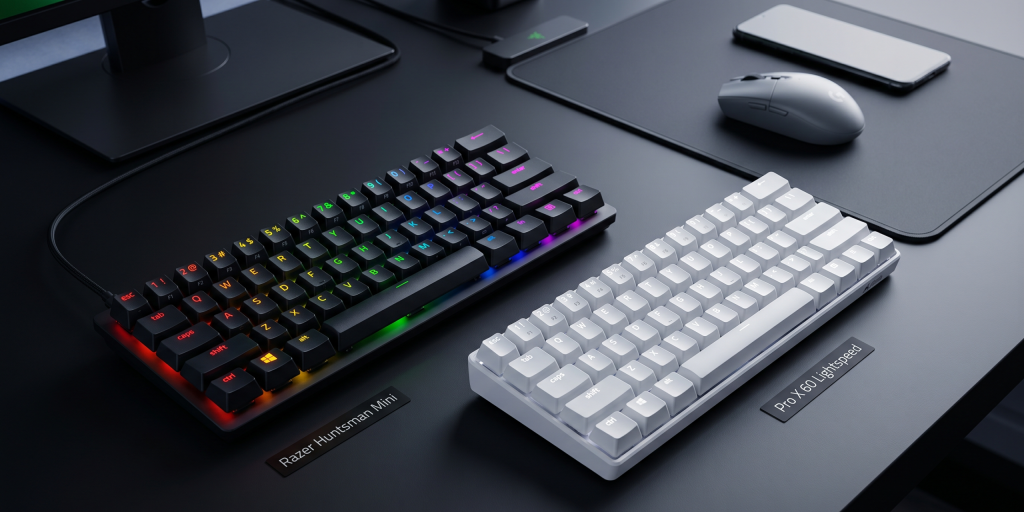
The landscape of competitive gaming has undergone a significant paradigm shift in recent years. As professional players prioritize expansive desk space for low-sensitivity mouse movements, the dominance of full-sized keyboards has waned, giving way to the compact efficiency of the 60% form factor. In this high-stakes arena, two devices stand as the primary contenders for the title of the ultimate eSports companion: the Razer Huntsman Mini ($119) and the Logitech G Pro X 60 Lightspeed ($179). This exhaustive analysis will elucidate the technical nuances of these compact powerhouses to determine which is the more viable solution for your competitive arsenal.
1. The 60% Philosophy: Portability and Ergonomics
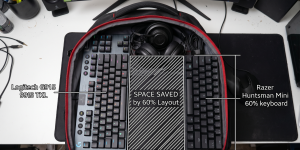
The 60% layout is defined by what it lacks—dedicated arrow keys, a function row, and a numpad. While this may seem restrictive to the uninitiated, the immediacy of access it provides to the mouse is unparalleled.
Razer Huntsman Mini: The Trailblazer
The Huntsman Mini was one of the first mainstream 60% boards to bring enthusiast-level features to the masses. Its construction is centered around a robust aluminum top plate that provides structural integrity while keeping the weight minimal for travel. The compact footprint is an ergonomic dream for gamers who tilt their keyboards at aggressive angles to maximize comfort during intense sessions.
Logitech G Pro X 60 Lightspeed: Engineered for the Pro
Logitech’s entry into the 60% space arrived with the explicit goal of catering to the elite. The G Pro X 60 features a slightly more industrial feel, utilizing high-grade polymers and a reinforced internal structure. Unlike the Razer, which relies solely on a wired connection, the Logitech offers Lightspeed wireless technology, providing a clutter-free environment without sacrificing a millisecond of latency.
2. Switch Technology: The Optical Frontier
In eSports, the speed of actuation is the difference between a victory and a defeat. Both manufacturers have moved away from traditional mechanical contacts in favor of Optical Switches.
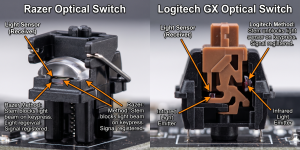
Razer Linear Optical Switches (Gen-2): Razer’s optical switches use an infrared light beam to register a keypress. This gen-2 iteration features silicon dampeners to reduce noise, resulting in a smooth, quiet, and incredibly fast typing experience. With a 1.0mm actuation point and a mere 40g of actuation force, the immediacy of input is exceptional.
Logitech GX Optical Switches: Logitech has introduced its own optical switches designed specifically for the G Pro series. These switches offer a crisp, tactile, or linear feel depending on your preference, but with the added reliability and speed of light-based actuation. They are engineered to withstand the rigorous demands of professional travel, ensuring that the performance remains consistent regardless of the environment.
3. Advanced Customization: KEYCONTROL vs. Razer Hypershift
The greatest challenge of a 60% keyboard is the loss of physical keys. To maintain functionality, both companies have developed sophisticated software solutions to “re-layer” the keyboard.
Logitech’s KEYCONTROL Innovation
The standout feature of the G Pro X 60 is KEYCONTROL. This software allows users to assign up to 15 different functions per key. By combining layers with the “G-Shift” modifier, you can effectively have a full-sized keyboard’s worth of utility at your fingertips. For a developer or a macro-heavy gamer, this makes the Logitech a highly viable tool for productivity outside of gaming.
Razer Hypershift
Razer’s solution is Hypershift, a long-standing feature in the Synapse ecosystem. By holding down a designated modifier key, you unlock a secondary set of functions across the entire board. While Hypershift is intuitive and powerful, KEYCONTROL offers a slightly more granular level of remapping that may appeal to those who need complex logical sequences programmed into their hardware.
4. Build Quality and Connectivity Dynamics
The viability of a keyboard often depends on how it handles the “chaos” of a tournament environment.
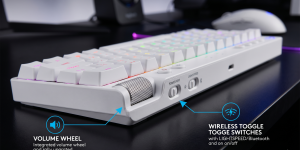
Logitech G Pro X 60: The inclusion of Bluetooth and 2.4GHz Lightspeed wireless makes this one of the most versatile compact boards on the market. It allows you to switch between your gaming PC and a laptop seamlessly. Furthermore, Logitech includes a dedicated volume roller on the side—a rare and welcome addition to a 60% board.
Razer Huntsman Mini: The Huntsman Mini is purely wired. While this may seem like a disadvantage in 2026, many pros prefer the “zero-risk” nature of a high-quality detachable USB-C cable. The Razer also features PBT Keycaps with side-printed secondary functions, making it easier for new 60% users to learn where the hidden media and function keys are located.
5. Lighting and Visual Dominance
For many, the aesthetic of the “battlestation” is an integral part of the experience.
Razer Chroma RGB: Razer continues its dominance in the lighting department. The Chroma ecosystem is unparalleled in its brightness, color accuracy, and integration with third-party games and apps. If you want your keyboard to react to your in-game health or environment, Razer is the clear winner.
Logitech LIGHTSYNC: Logitech takes a more conservative approach. The lighting is crisp and well-distributed, but it lacks the sheer “wow factor” and extensive library of reactive effects found in Razer Synapse. However, LIGHTSYNC is less taxing on system resources, which may appeal to those running on mid-range hardware.
6. The “Travel” Factor
Both keyboards are designed with the traveling professional in mind. The Logitech G Pro X 60 comes with a high-quality carrying case, which is a massive value-add for anyone attending LAN parties or tournaments. The Razer Huntsman Mini is lighter and has a smaller overall footprint, fitting easily into any backpack, though it lacks a dedicated case in the box.
Final Verdict: Choosing Your Compact Weapon
The competition between the Razer Huntsman Mini and the Logitech G Pro X 60 Lightspeed is a battle of price versus feature density.
Choose the Razer Huntsman Mini if:
You want a battle-proven, compact mechanical experience at a much more viable price point ($119).
You prioritize the best-in-class RGB lighting and deep integration with the Razer ecosystem.
You prefer a lightweight, wired-only setup for absolute simplicity and reliability.
Choose the Logitech G Pro X 60 Lightspeed if:
Wireless freedom is a non-negotiable requirement for your setup.
You need the advanced remapping capabilities of KEYCONTROL for complex gaming or work macros.
You value the “Pro” package, including the dedicated volume wheel and the protective carrying case.
In conclusion, while the Razer Huntsman Mini remains the “people’s champion” for its accessibility and performance, the Logitech G Pro X 60 Lightspeed represents the new pinnacle of eSports engineering. Both boards offer the dominance and immediacy required for the modern gamer, proving that in 2026, smaller really is better.
