Versus & Comparisons
Logitech G915 TKL vs. Razer DeathStalker V2 Pro: The Definitive Low-Profile Showdown
May
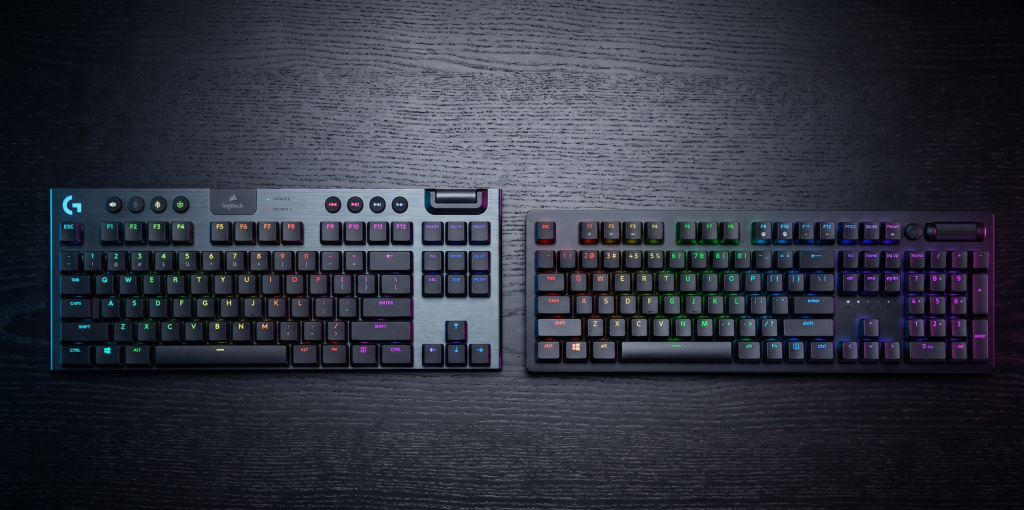
The evolution of mechanical keyboards has recently witnessed a significant paradigm shift toward low-profile designs. No longer are enthusiasts forced to choose between the ergonomic comfort of a chiclet keyboard and the tactile feedback of a mechanical one. At the pinnacle of this niche stand two legendary devices: the Logitech G915 TKL Lightspeed and the Razer DeathStalker V2 Pro. This exhaustive comparison will elucidate the architectural nuances, wireless efficiency, and typing dynamics of both boards to determine which remains the most viable flagship for a modern, high-performance setup.
1. Architectural Design and Aesthetic Philosophy
When investing over $200 in a peripheral, build quality is not just a preference; it is a necessity. Both Logitech and Razer have employed premium materials, yet their design languages diverge significantly.
The Industrial Elegance of Logitech G915 TKL
The Logitech G915 TKL ($229) is a masterpiece of industrial engineering. It features a top plate made of aircraft-grade 5052 aluminum alloy joined to a steel-reinforced base. This results in a chassis that is remarkably thin—less than 22mm—yet possesses incredible structural integrity. The brushed metal finish provides an air of sophisticated dominance, making it equally suitable for a high-end gaming rig or a professional executive office.
The Modern Minimalist: Razer DeathStalker V2 Pro
Razer’s entry into the low-profile arena, the DeathStalker V2 Pro ($249), opts for a cleaner, more contemporary aesthetic. Its top plate is constructed from 5052 aluminum, providing a stiff, flex-free typing experience. While the G915 TKL has a more “classic” tech look with its dedicated circular media buttons, the DeathStalker feels like a piece of futuristic hardware. It is slightly more compact, focusing on a minimalist footprint that maximizes desk space without sacrificing functional utility.
2. Switch Technology: Mechanical Reliability vs. Optical Speed
The core of any keyboard’s performance lies in its switches. This is where the technological immediacy of the input is decided.
Logitech’s GL Low-Profile Switches
The G915 TKL utilizes Logitech’s proprietary GL switches (manufactured in partnership with Kailh). These are traditional mechanical switches reduced in height. They are available in Linear, Tactile, and Clicky variants. The tactile version, in particular, offers a subtle “bump” that provides excellent feedback for typists who transition from full-sized mechanical boards. However, being traditional mechanical switches, they rely on physical metal contacts, which inherently introduces a minute amount of debounce delay compared to optical alternatives.
Razer’s Low-Profile Optical Switches
Razer has raised the stakes by implementing Optical Switches in the DeathStalker V2 Pro. Instead of physical contact, these switches use a beam of light to register a keystroke. This architectural choice eliminates debounce delay entirely, providing a level of immediacy that is theoretically superior for competitive gaming. Razer’s switches also feature a silicon dampener, making them quieter than Logitech’s GL Linears, which is a vital consideration for those working in shared spaces or late-night gaming sessions.
3. Connectivity and Wireless Ecosystems
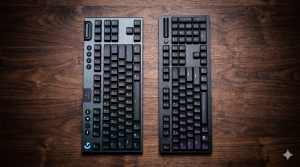
In the world of wireless peripherals, stability and latency are the two pillars of success. Both brands have spent years perfecting their proprietary protocols to ensure they are viable for professional eSports.
Logitech Lightspeed: Widely regarded as the industry gold standard, Lightspeed technology offers a 1ms report rate. In real-world testing, it is virtually indistinguishable from a wired connection. The G915 TKL also allows for seamless switching between Lightspeed (USB Dongle) and Bluetooth, making it an excellent tool for multi-device workflows.
Razer HyperSpeed: Razer’s HyperSpeed technology is equally impressive, utilizing adaptive frequency technology to scan for interference every millisecond and switch to the cleanest channel. Like the Logitech, the DeathStalker V2 Pro supports multi-device Bluetooth pairing, allowing you to switch from your gaming PC to your iPad Pro with a single button press.
4. Keycap Durability and Material Science
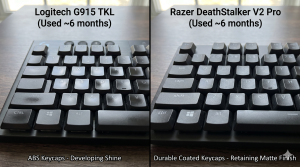
A common criticism of the Logitech G915 TKL has been its keycaps. They are made of thin ABS plastic with a protective coating. Over time, these keycaps are prone to “shining” as the oils from your fingers wear down the surface. Furthermore, because of their proprietary stem design, finding third-party replacements is nearly impossible.
Razer has addressed this weakness directly. The DeathStalker V2 Pro features laser-etched keycaps with an ultra-durable coating that Razer claims is even tougher than PBT. In long-term use, the Razer keycaps maintain their texture and “matte” look far better than the Logitech. For a user focused on long-term viable aesthetics, Razer holds a clear advantage in this category.
5. Battery Longevity and Power Management
Wireless power management is a crucial factor for the user who hates being tethered to a cable.
G915 TKL Performance: With RGB lighting at 100% brightness, the G915 TKL offers approximately 40 hours of use. While this sounds modest, Logitech’s power-saving sleep modes are incredibly efficient. If you turn the lighting off, the battery life extends to a staggering 1,100+ hours.
DeathStalker V2 Pro Performance: Razer’s optical switches require more power to maintain the light sensors. Consequently, the DeathStalker offers about 40-45 hours with RGB at 50%. While comparable to the Logitech, it does not quite reach the same legendary “lights-off” longevity as the G915. However, Razer utilizes USB-C for charging, whereas older models of the G915 TKL still frustratingly use Micro-USB (ensure you check for the 2025/2026 refreshed USB-C models).
6. Software Integration: G Hub vs. Razer Synapse
As someone pursuing a career as a Solution Architect, you understand that software is the soul of hardware.
Logitech G Hub: Known for its clean UI and efficiency. G Hub makes it easy to sync lighting across your Logitech mouse and headset. It is generally less “resource-heavy” than Razer’s software, though some users find its menu nesting to be slightly counter-intuitive.
Razer Synapse 3: Synapse offers unparalleled customization. The “Chroma RGB” ecosystem is arguably the best in the world, allowing for per-key lighting that reacts to in-game events. However, Synapse is notorious for being a “heavy” application that requires significant system resources to run in the background.
7. Ergonomic Viability and Typing Feel
The primary reason to buy a low-profile board is ergonomics. By keeping the wrists flatter, these keyboards reduce the risk of repetitive strain injuries.
The Logitech G915 TKL has a slightly more “mushy” bottom-out feel on its linear switches, which some find comfortable for long typing sessions. The Razer DeathStalker V2 Pro feels snappier and more responsive. The keys “bounce” back faster, which is excellent for rapid typing but might feel “stiff” to those used to the softer landing of the G915.
Final Verdict: The King of Low-Profile
Both of these keyboards represent the dominance of their respective brands in the wireless market.
Choose the Logitech G915 TKL if:
You want a battle-proven, industrial design that looks professional in any setting.
You prioritize extreme battery life (with RGB off) and the most reliable wireless connection in the industry.
You prefer the specific tactile feel of the GL Tactile switches.
Choose the Razer DeathStalker V2 Pro if:
You want the absolute latest in Optical Switch technology for a competitive gaming edge.
You value keycap durability and want a board that won’t show “wear and tear” after a few months.
You prefer the convenience of USB-C and the most vibrant RGB ecosystem available.
In conclusion, while the Logitech G915 TKL is a legendary veteran that still holds its ground, the Razer DeathStalker V2 Pro is the more modern, technically advanced viable solution for 2026. It addresses the flaws of its competitor while introducing optical speed that simply cannot be ignored.
