Versus & Comparisons
Logitech MX Mechanical vs. Keychron K3 Max: The Productivity Powerhouse Battle
May
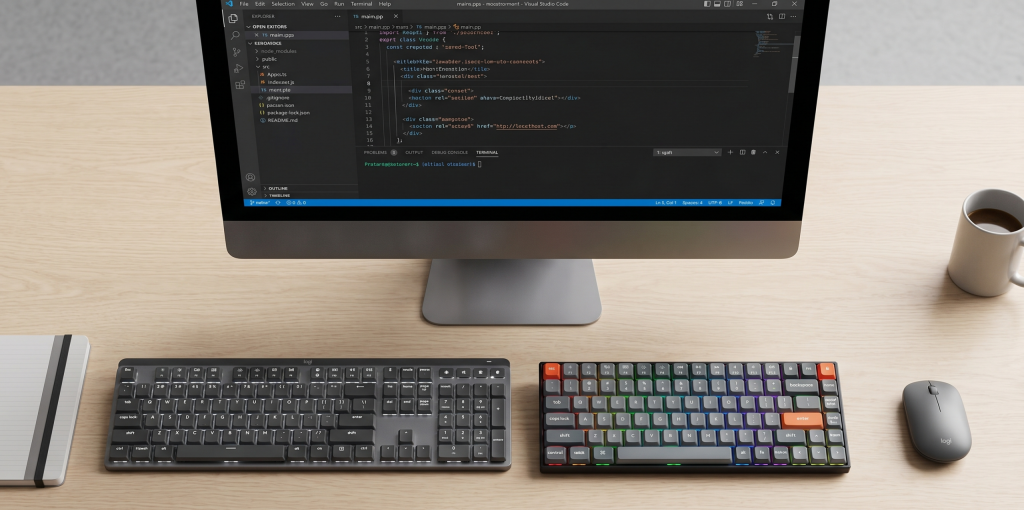
In the contemporary landscape of professional workspace aesthetics, a significant paradigm shift has occurred. The era of bulky, loud mechanical keyboards relegated solely to gaming dens is over. Today, the modern professional—especially those aspiring to be a Solution Architect or a software developer—demands a tool that combines the tactile immediacy of mechanical switches with the sleek, low-profile ergonomics of a high-end office peripheral. This demand has birthed two dominant contenders: the Logitech MX Mechanical and the Keychron K3 Max. This exhaustive comparison will elucidate the technical nuances and ergonomic viability of these two devices to determine which should anchor your professional ecosystem.
1. Architectural Integrity and Industrial Design
When constructing a high-performance workstation, the physical build of your tools is integral to long-term productivity.
Logitech MX Mechanical: The Corporate Titan
The Logitech MX Mechanical ($169) is designed with a “pro-grade” aesthetic that fits seamlessly into a corporate environment. It utilizes a top plate made of low-carbon aluminum, providing a stiff, flex-free base. The design is sober, featuring a two-tone gray color scheme that emphasizes its identity as a serious tool rather than a toy. It feels robust and purposefully heavy, ensuring it remains anchored to your desk even during the most frantic coding sessions at FPT Polytechnic.
Keychron K3 Max: The Ultra-Portable Specialist
The Keychron K3 Max ($94), on the other hand, is a marvel of miniaturization. Keychron has established its dominance in the low-profile market by pushing the boundaries of how thin a mechanical keyboard can be. The K3 Max features a reinforced aluminum frame that is remarkably slim. Its minimalist footprint is designed for the modern nomad who moves between a home office, a coffee shop, and a university lecture hall. While it feels less “industrial” than the Logitech, its build quality is exceptional for its price point.

2. Typing Dynamics: Elucidating the Switch Experience
For a developer, the “feel” of the keyboard is not a luxury; it is a fundamental requirement for maintaining flow state.
Logitech Tactile Quiet Switches: Logitech offers their “Tactile Quiet” switches (comparable to Cherry MX Browns but with a shorter travel). These switches are engineered for office viability; they provide a satisfying tactile bump without the disruptive noise of traditional mechanical boards. The immediacy of the actuation is crisp, though the keys have a slightly “mushy” bottom-out feel compared to enthusiast-grade boards.
Keychron Low-Profile Gateron Switches: The K3 Max utilizes Gateron’s latest low-profile switches. What sets the Keychron apart is its Hot-Swappable capability—a feature rarely found in mainstream “productivity” keyboards. This allows you to swap switches without soldering, giving you the freedom to customize your tactile experience. Whether you prefer the smoothness of linears or the sharp snap of blue switches, the K3 Max offers a level of nuance the MX Mechanical cannot match.

3. Software Ecosystems: Corporate Ease vs. Open-Source Logic
As an aspiring Solution Architect at a company like Google or Facebook, you understand that software architecture defines the user experience.
Logi Options+ (Logitech)
Logitech’s software is the pinnacle of user-friendly “Plug-and-Play” logic. The Logi Options+ suite allows for deep customization of the function row and dedicated keys. The standout feature is Logitech Flow, which allows you to move your cursor—and your keyboard’s focus—across multiple computers (even between Windows and macOS) as if they were a single monitor. For someone managing a multi-device server environment, this feature is a game-changer.
QMK/VIA (Keychron)
The Keychron K3 Max takes a more “developer-centric” approach by supporting QMK and VIA. This is open-source firmware that allows you to remap every single key and create complex layers directly on the hardware’s EEPROM. There is no “heavy” software running in the background. Once you program your layout, it lives on the keyboard forever. For those who value privacy and technical control, the Keychron’s software architecture is arguably more viable.
4. Connectivity and Multi-Device Dominance
Both keyboards are designed to be the “brain” of a multi-device setup, yet they utilize different wireless protocols.
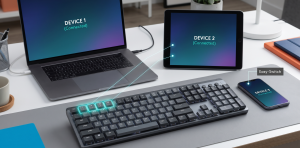
Logitech Bolt Technology: The MX Mechanical uses Logitech’s proprietary Logi Bolt USB receiver along with Bluetooth Low Energy. Bolt is designed for maximum security and stability in congested office environments (like a crowded classroom at FPT Polytechnic). It supports pairing with up to three devices with near-instantaneous switching.
Keychron 2.4GHz & Bluetooth: The K3 Max is a significant upgrade over previous models because it includes a high-speed 2.4GHz wireless dongle in addition to Bluetooth 5.1. This provides a 1000Hz polling rate, ensuring that the immediacy of your typing is on par with a wired connection, which is essential if you occasionally use your productivity board for gaming titles like Valorant or League of Legends.
5. Ergonomics and Long-Term Health
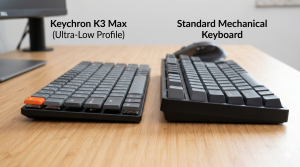
The primary benefit of a low-profile keyboard is the reduction of wrist extension. By keeping the hands flatter, you minimize the risk of repetitive strain injuries—a critical consideration for a student planning a lifelong career in software development.
Logitech MX Mechanical: Offers two tilt angles via its integrated feet. The keys are full-sized, which means the transition from a standard keyboard is easy, but it requires a slightly larger hand span.
Keychron K3 Max: Is naturally flatter and more compact. Because it is a 75% layout, your mouse is physically closer to your center of gravity, reducing shoulder strain. However, the compact nature means the keys are closer together, which might require a short adjustment period to avoid typos.
6. Battery Longevity and Power Management
Logitech: Is legendary for its battery management. With the smart backlighting on (it only glows when your hands approach), it lasts about 15 days. With backlighting off, it can last an astonishing 10 months.
Keychron: Because it utilizes more standard RGB lighting and a smaller battery to maintain its slim profile, it lasts about 30–40 hours with lighting on. It is a viable solution but requires more frequent charging via its USB-C port.
Final Verdict: The Logical Choice for Your Career
The decision between the Logitech MX Mechanical and the Keychron K3 Max depends on your professional philosophy.
Choose the Logitech MX Mechanical if:
You value a stable, corporate-grade ecosystem with features like Logitech Flow.
You want the best possible battery life and a “set it and forget it” user experience.
You prefer a full-sized or nearly full-sized layout for heavy data entry or spreadsheet work.
Choose the Keychron K3 Max if:
You are a developer who wants the freedom of Hot-Swappable switches and open-source QMK/VIA firmware.
Portability is a priority, and you need a keyboard that fits easily into a backpack for university or travel.
You want a modern, minimalist aesthetic that offers a higher degree of hardware customization.
Both keyboards represent a viable evolution in how we interact with our digital workspaces. In 2026, whether you choose the corporate dominance of Logitech or the enthusiast-grade flexibility of Keychron, you are investing in a tool that will elevate your efficiency as you climb the ladder toward becoming a Solution Architect.
