Versus & Comparisons
The Mid-Range TKL War: Corsair K70 RGB TKL vs. SteelSeries Apex 9 TKL
May
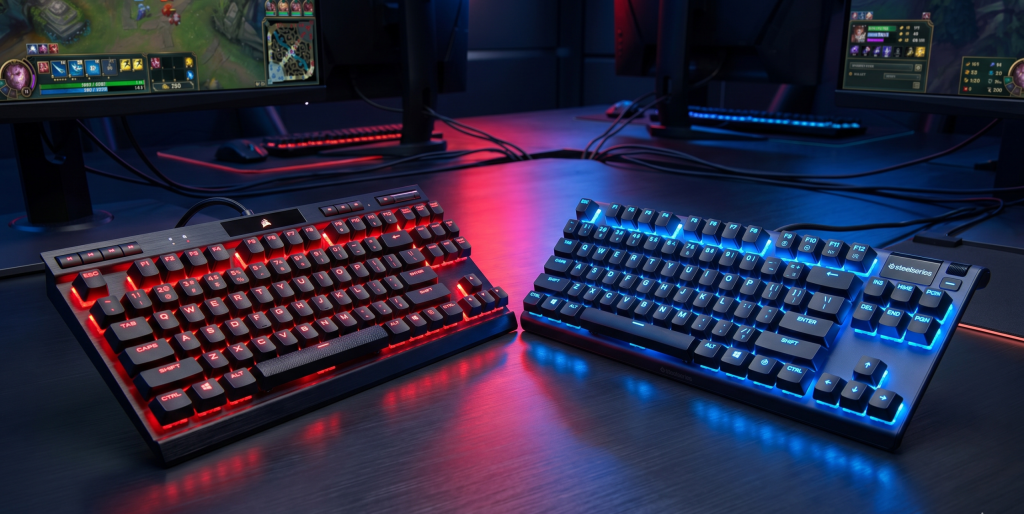
In the current landscape of gaming peripherals, the Tenkeyless (TKL) form factor has established undisputed dominance. By removing the numpad, these keyboards provide the necessary desk real estate for expansive mouse movements while maintaining an integral set of function keys. Today, we look at a fierce rivalry in the mid-range sector: the Corsair K70 RGB TKL Champion Series ($139) and the SteelSeries Apex 9 TKL ($139). This comparison will elucidate the technical nuances that separate these two machines to help you decide which is the superior weapon for your digital arsenal.
1. Design and Architectural Integrity
When evaluating mid-range hardware, “build quality” is often where the first compromises appear. However, both Corsair and SteelSeries have managed to maintain a premium feel.
Corsair K70 RGB TKL: The Tournament Veteran
The Corsair K70 RGB TKL is part of the “Champion Series,” meaning it was designed with direct input from eSports professionals. It features an iconic brushed aluminum top plate that provides exceptional architectural integrity. It feels dense, immovable, and ready for the rigors of travel. A standout feature is the dedicated media row and the high-quality aluminum volume roller—luxuries rarely found on TKL boards in this price bracket.
SteelSeries Apex 9 TKL: The Streamlined Specialist
The SteelSeries Apex 9 TKL takes a more minimalist approach. It utilizes a series-5000 aluminum top plate that is equally durable but noticeably lighter. The design language is cleaner, opting for a smaller footprint that prioritizes “Desk Zen.” While it lacks the dedicated media keys of the Corsair, it features a clickable metal roller and a media button that handles multiple functions through different press combinations.
2. Switch Technology: Mechanical Tradition vs. Optical Innovation
This is where we witness a significant paradigm shift in input technology. The choice here defines the immediacy of your actions in-game.
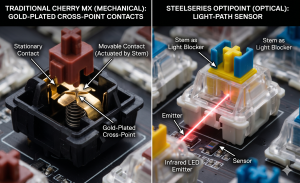
Corsair’s Mechanical Precision: The K70 RGB TKL traditionally utilizes Cherry MX Speed Silver switches. These are linear mechanical switches with a short 1.2mm actuation point. They are the gold standard for mechanical speed, offering a familiar, reliable “clack.” However, being purely mechanical, they still rely on physical metal contacts which require debouncing logic.
SteelSeries OptiPoint Optical Switches: The Apex 9 TKL utilizes OptiPoint optical switches. Instead of physical contact, these use a beam of light to register the keypress. This architecture allows for two major advantages: it eliminates debounce delay for absolute immediacy, and it allows for Dual-Point Actuation. You can toggle the keys between a “Gaming Mode” (1.0mm actuation) and a “Typing Mode” (1.5mm actuation).
3. The “Tournament Mode” Feature
Corsair introduces a unique logical feature that is a dream for competitive players: the Tournament Switch. Located on the back of the keyboard, flipping this switch immediately:
Changes the RGB to a static, non-distracting color.
Disables all macros and accidental “Windows Key” presses.
Ensures the keyboard is in its most basic, distraction-free state for tournament play.
SteelSeries counters this with deep software profiles, but it lacks the physical, tactile “Immediacy” of Corsair’s dedicated hardware toggle.
4. Software Ecosystem and Firmware Logic
As a Solution Architect, you likely analyze the efficiency of the software controlling your hardware.
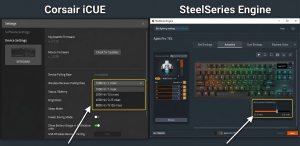
Corsair iCUE & AXON: The K70 RGB TKL is powered by AXON Hyper-Processing Technology, which allows for a 8,000Hz polling rate. This means the keyboard talks to your PC 8 times more frequently than standard 1,000Hz boards. While the difference is measured in microseconds, it ensures that your input is processed with the highest possible priority. iCUE remains a powerful, if complex, suite for managing these settings.
SteelSeries GG (Engine): SteelSeries GG is arguably more modern and lightweight. Setting the dual-point actuation on the Apex 9 TKL is incredibly intuitive. The “Engine” app allows you to tie specific actuation heights to different games automatically—a viable solution for users who jump between Valorant (Gaming Mode) and coding projects (Typing Mode).
5. Keycaps and Long-Term Durability
Both keyboards have finally embraced PBT Double-shot keycaps as the standard in this tier.
PBT (Polybutylene Terephthalate) is a superior material compared to the ABS plastic found on cheaper boards.
It does not develop a “greasy shine” over time and the legends (letters) will never fade because they are molded from a separate piece of plastic rather than printed on.
In this regard, both boards are a viable long-term investment that will maintain their aesthetic dominance for years.
6. Portability and the “Travel” Factor
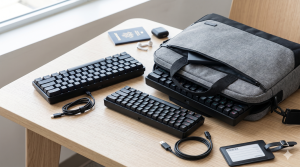
For a student who carries their gear to FPT Polytechnic or LAN events, portability is a key nuance. Both boards feature:
Detachable USB-C Cables: This prevents the most common point of failure—cable fraying at the junction—and makes them easy to pack.
Standard Layout: Both use a standard bottom row, meaning if you ever want to customize them with enthusiast keycaps in the future, you have that freedom.
7. Typing Experience vs. Gaming Performance
Typing: The SteelSeries Apex 9 TKL wins slightly here. The ability to switch to a 1.5mm actuation point makes for fewer typos during long essay-writing sessions. The OptiPoint switches feel smoother and have less “scratchiness” than traditional Cherry MX switches.
Gaming: The Corsair K70 RGB TKL feels more like a dedicated weapon. The dedicated media keys, the 8,000Hz polling, and the physical tournament switch make it feel “over-engineered” for performance.
Final Verdict: Which TKL Wins the War?
The decision hinges on whether you value Mechanical Heritage or Optical Innovation.
Choose the Corsair K70 RGB TKL if:
You want the absolute fastest polling rate (8,000Hz) and dedicated media controls.
The physical Tournament Switch is a feature you will actually use for competitive events.
You prefer the “heavy-duty” feel of a thicker aluminum chassis.
Choose the SteelSeries Apex 9 TKL if:
You want the benefits of Optical Switches (no debounce delay, better longevity).
You value the viability of dual-actuation points for switching between work and play.
You prefer a more minimalist, streamlined design that fits a modern desk aesthetic.
In the mid-range TKL war of 2026, both of these keyboards offer a level of dominance that was previously reserved for $200+ flagships. Whether you choose the feature-packed Corsair or the innovative SteelSeries, you are securing a tool that will significantly elevate your digital performance.
