Versus & Comparisons
Keychron Q1 Pro vs. SteelSeries Apex Pro TKL: Custom Craft Meets Magnetic Precision
May
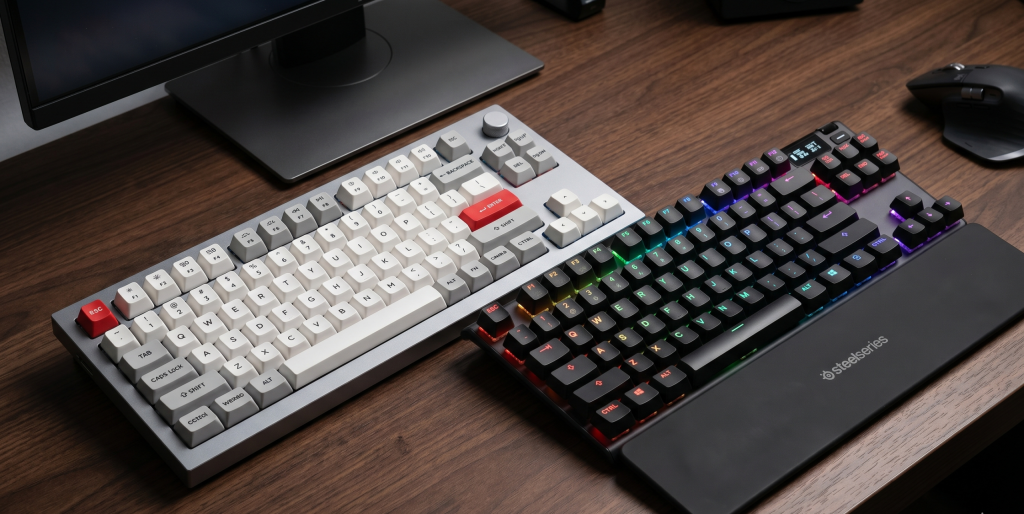
In the modern era of peripheral evolution, the boundary between professional tools and gaming gear has become increasingly blurred. Two keyboards currently stand at the forefront of this intersection: the Keychron Q1 Pro and the SteelSeries Apex Pro TKL. While one is born from the tactile, acoustic-focused world of custom mechanical keyboards, the other is a marvel of Hall Effect magnetic technology designed for near-instantaneous immediacy. This comparison will elucidate the stark contrasts between these two titans to determine which is the more viable investment for your desktop ecosystem.
1. Design and Structural Integrity
The physical construction of these two boards reveals fundamentally different philosophies regarding what a premium keyboard should be.
The Keychron Q1 Pro: An Aluminum Fortress
The Keychron Q1 Pro ($199) is a masterclass in industrial design. Unlike standard gaming keyboards, the Q1 Pro features a full CNC-machined aluminum body. It is remarkably heavy, providing a sense of “premium weight” that prevents any sliding during intense typing sessions. Internally, it utilizes a double-gasket mount design, which allows the entire internal plate to “flex” slightly. This results in a cushioned typing experience and an acoustic profile—often described as a “creamy” or “thocky” sound—that is highly coveted by enthusiasts.
The SteelSeries Apex Pro TKL: The eSports Command Center
In contrast, the SteelSeries Apex Pro TKL ($189) focuses on functional utility and eSports aesthetics. While it features an aircraft-grade aluminum top plate, the bottom casing is plastic, making it significantly lighter than the Keychron. Its most distinctive physical feature is the OLED Smart Display in the top right corner. This screen allows for on-the-fly profile switching, setting adjustments, and even displaying custom GIFs or system stats, providing a level of interactive feedback the Keychron lacks.
2. Switch Technology: Mechanical vs. Magnetic
The most significant divergence between these two devices lies beneath the keycaps.
OmniPoint 2.0 (SteelSeries): The Apex Pro TKL utilizes Hall Effect magnetic sensors rather than traditional physical contacts. This allows for Adjustable Actuation, where you can customize the travel distance of every single key from a shallow 0.1mm to a deep 4.0mm. Furthermore, it supports Rapid Trigger technology, which resets the key the millisecond you lift your finger. For competitive gamers in titles like Valorant or Counter-Strike, this provides a level of immediacy that a standard mechanical switch simply cannot replicate.
Keychron K Pro Switches: The Q1 Pro comes with Keychron’s factory-lubed mechanical switches. While they offer a superior, smoother feel for typing and coding, they are bound by the laws of traditional mechanics. They have a fixed actuation point. However, because the Q1 Pro is Hot-Swappable, you have the freedom to install any enthusiast-grade switch (like Holy Pandas or Gateron Ink Blacks) to tailor the board to your exact tactile preference.
3. Customization and Software Ecosystem
As a budding Solution Architect, you likely appreciate systems that offer deep, open configuration.
QMK/VIA (Keychron): The Q1 Pro does not use traditional “bloatware” software. Instead, it supports QMK and VIA, which are open-source industry standards. You can remap every key, create layers, and program complex macros through a web browser. The changes are saved directly to the keyboard’s hardware (EEPROM), meaning your settings persist regardless of which computer you plug it into.
SteelSeries Engine (GG): The Apex Pro TKL relies on the SteelSeries GG suite. While the software is feature-rich—offering deep RGB synchronization and GameSense integration—it is a heavy application that must run in the background for certain advanced features. The trade-off is a much more user-friendly “Plug-and-Play” experience for those who don’t want to dive into open-source firmware.
4. Connectivity: The Wireless Debate
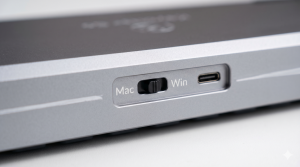
Keychron Q1 Pro: This model is designed for a clutter-free desk. It features Bluetooth 5.1 connectivity, allowing it to pair with up to three devices (Mac, Windows, or Linux). While Bluetooth is perfect for productivity and casual gaming, it is not recommended for high-stakes eSports due to inherent latency.
SteelSeries Apex Pro TKL: While there is a wireless “Lightspeed” version, the standard TKL is wired. This ensures the most stable connection possible, prioritizing raw performance over aesthetic minimalism.
5. Typing Experience vs. Gaming Performance
The “Feel” of a keyboard is subjective, yet there is a clear winner in each category.
For the Typist/Coder: The Keychron Q1 Pro is the superior choice. The combination of the gasket mount, the sound-dampening foam, and the high-quality PBT keycaps makes typing a joy. It feels like a high-end tool meticulously engineered for comfort.
For the Competitive Gamer: The SteelSeries Apex Pro TKL is the undisputed champion. The magnetic switches and the Rapid Trigger feature provide a mechanical advantage in games that require rapid, stutter-stepping movements.
Final Verdict
The choice between these two boards depends on your primary use case.
If your daily life revolves around heavy typing, software development, and a love for “thocky” acoustics, the Keychron Q1 Pro offers a level of build quality that the gaming industry rarely achieves. It is a viable long-term companion for any professional.
However, if you are seeking the absolute edge in competitive gaming where every millisecond counts, the SteelSeries Apex Pro TKL’s magnetic innovation provides a level of dominance in performance that justifies its price tag. Both keyboards are elite in their respective domains, representing the absolute best that 2026 has to offer in peripheral technology.
