Versus & Comparisons
Magnetic Dominance: SteelSeries Apex Pro Gen 3 vs. Corsair K70 MAX
May
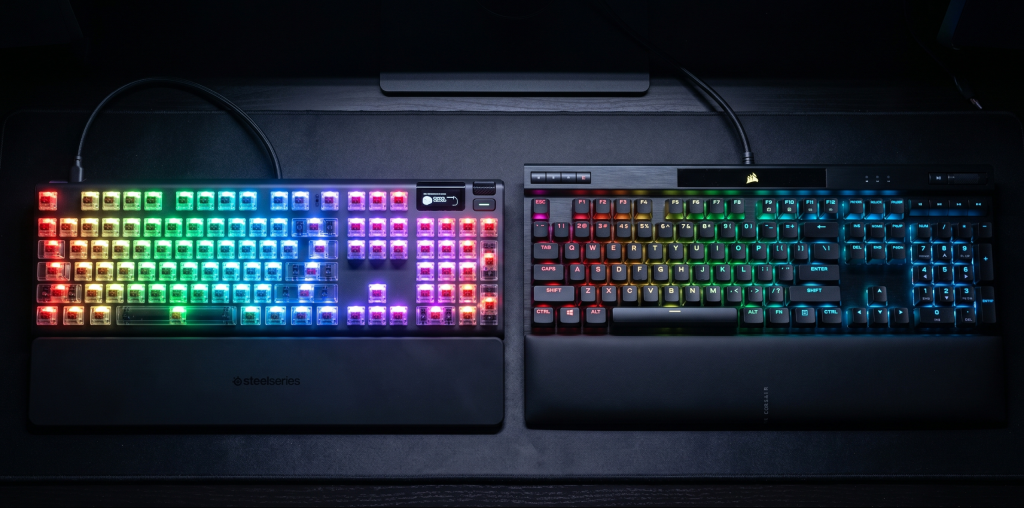
The mechanical keyboard industry is currently undergoing its most significant paradigm shift since the invention of the Cherry MX switch. For years, the gold standard for competitive gaming was defined by physical contact and debouncing delays; however, a new era of magnetic dominance has emerged. This transition, fueled by Hall Effect sensor technology, has redefined our expectations for immediacy in gaming peripherals. In this exhaustive comparison, we will elucidate the intricate differences between the two titans of the magnetic realm: the SteelSeries Apex Pro Gen 3 and the Corsair K70 MAX. For a budding Solution Architect, understanding the underlying logic and hardware-software synergy of these devices is essential to determining which remains the most viable investment for an elite setup.
1. The Science of the Hall Effect: A Mechanical Evolution
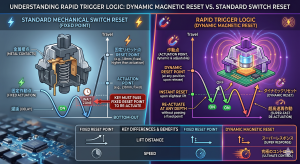
Before diving into the specific models, it is crucial to understand why magnetic switches have established such dominance in the market. Traditional mechanical switches rely on a metal leaf making physical contact. This process requires “debouncing”—a software delay to prevent a single press from being registered multiple times.
In contrast, the Hall Effect switches found in the SteelSeries Apex Pro Gen 3 and Corsair K70 MAX use a magnet and a sensor to measure the exact distance of the keypress. This architecture allows for:
Hyper-Fast Immediacy: Zero debounce delay means your actions are registered the moment the light sensor detects movement.
Variable Actuation: You can software-program each key to activate at any point from a hair-trigger 0.1mm to a deep 4.0mm.
Rapid Trigger: The key resets the instant you begin lifting your finger, not when it passes a fixed physical point.

2. SteelSeries Apex Pro Gen 3: The Refined Legend
The SteelSeries Apex Pro Gen 3 ($249) is the latest iteration of the keyboard that popularized magnetic switches. SteelSeries has focused on refining the internal acoustics and sensor precision to maintain its market dominance.
OmniPoint 3.0 Technology
The heart of the Gen 3 is the OmniPoint 3.0 switch. SteelSeries has engineered these switches to be smoother and more stable than their predecessors. The immediacy of these sensors is complemented by a “Protection Mode,” a logical feature that prevents accidental keypresses on surrounding keys—a common issue when using ultra-sensitive 0.1mm actuation.
Architectural Integrity and OLED Feedback
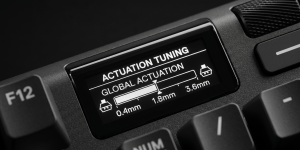
Structurally, the Apex Pro Gen 3 utilizes a series of sound-dampening layers, including triple-layer foam and per-key lubrication. This ensures that the typing experience is not only fast but also acoustically pleasing—a mandatory requirement for any viable high-end peripheral in 2026. The signature OLED Smart Display remains a standout feature, allowing users to adjust actuation points on-the-fly without needing to open the SteelSeries GG software.
3. Corsair K70 MAX: The Heavyweight Challenger
Corsair has countered with the K70 MAX ($229), a keyboard that emphasizes raw technical specifications and “overbuilt” durability.
Corsair MGX Switches and AXON Hyper-Processing
The K70 MAX features Corsair MGX magnetic-mechanical switches. While similar to SteelSeries’ OmniPoint, Corsair leverages its AXON Hyper-Processing Technology to deliver an 8,000Hz polling rate. This means the keyboard communicates with your PC 8,000 times per second, ensuring the absolute maximum level of immediacy currently available in the consumer market.
Dual-Actuation Logic
A unique feature of the K70 MAX is the ability to assign two different actions to a single keypress. For example, you can program a key to “Walk” when pressed lightly (0.4mm) and “Run” when bottomed out (3.6mm). This level of input logic is a dream for gamers seeking to optimize their macro configurations and in-game efficiency.
4. Build Quality: Aesthetics vs. Utility
When comparing the architectural integrity of these two boards, the differences become clear:
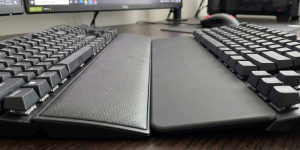
Corsair K70 MAX: Features a massive, brushed aluminum top plate with a triangular “tri-hex” pattern. It feels incredibly dense and industrial. It also includes a high-quality, magnetic leatherette wrist rest that provides excellent ergonomic support.
SteelSeries Apex Pro Gen 3: Opts for a slightly more compact, sleek design. While still utilizing an aluminum top plate, the Gen 3 feels more “refined” and less bulky than the Corsair. Its wrist rest is made of a soft-touch rubber that is easier to clean but lacks the plush feel of Corsair’s memory foam.
5. Software Ecosystem: iCUE vs. SteelSeries GG
For a student of Software Development, the software interface is a vital component of the user experience.
SteelSeries GG (Engine): Is praised for its modern UI and ease of use. Setting up Rapid Trigger and per-key actuation is intuitive. It also includes “Sonar,” a powerful audio suite that integrates seamlessly with the keyboard’s OLED screen.
Corsair iCUE: Is a massive, complex ecosystem. While it offers more granular control over RGB lighting layers and sensor monitoring, it has a steeper learning curve. However, if you already own other Corsair components, the synergy within iCUE is a highly viable reason to choose the K70 MAX.
6. Competitive Advantage: Rapid Trigger Performance
In the realm of eSports, Rapid Trigger is the feature that provides a true mechanical advantage.
SteelSeries has arguably the most mature implementation of this tech. It feels consistent and predictable, which is essential for games like Valorant where counter-strafing must be exact.
Corsair provides slightly more customization in terms of the “reset” distance, but some users find the sheer amount of options in iCUE to be overwhelming.
Regardless of the brand, once you experience the immediacy of magnetic reset points, returning to a standard mechanical keyboard feels like a step backward in technological evolution.
7. Conclusion: Determining the Victor
Choosing between the SteelSeries Apex Pro Gen 3 and the Corsair K70 MAX is a matter of prioritizing “Quality of Life” versus “Raw Specification.”
Choose the SteelSeries Apex Pro Gen 3 if:
You value a more refined, quieter typing experience with superior sound dampening.
You want the convenience of an OLED screen for instant adjustments.
You prefer a more user-friendly and modern software interface.
Choose the Corsair K70 MAX if:
You want the absolute technical peak of 8,000Hz polling and dual-actuation logic.
You prefer a heavy, industrial build with a plush leatherette wrist rest.
You are already invested in the Corsair iCUE ecosystem for your PC build.
