
Maintenance & Technical Guides
Ergonomic Workspace Architecture: Engineering the Physical Foundation for Long-Term High Performance
May
In the high-stakes environment of software development and systems engineering, we often obsess over the architectural integrity of our code and the immediacy of our hardware’s response. However, a seasoned Solution Architect recognizes that the most critical system failure does not occur in the cloud or on the PCB—it occurs in the physical body of the operator. Neglecting the ergonomics of your workspace is the ultimate form of “Biological Technical Debt.” For a 17-year-old student at FPT Polytechnic Danang aiming for an IELTS 7.5+ and a career at a “Big Tech” firm like Google, maintaining your physical health is integral to sustained cognitive dominance. This article will elucidate the principles of Ergonomic Workspace Architecture, providing a viable blueprint to optimize your interface with the digital world.
1. The Biology of the Architect: Understanding RSI and Fatigue
To optimize a system, one must understand its constraints. The human body is not naturally designed for the repetitive, static posture required by a 12-hour coding marathon. When we maintain a suboptimal position, we introduce “Mechanical Stress” into our musculoskeletal ecosystem.
This stress often manifests as Repetitive Strain Injury (RSI) or Carpal Tunnel Syndrome. These are not merely inconveniences; they are system-wide failures that can jeopardize your ability to complete an internship or graduate with your current honors status. By applying ergonomic logic, we can perform a paradigm shift from a “Survival-based” workspace to an “Optimization-based” one, ensuring that the structural integrity of your joints remains intact through years of intense professional use.
2. Desktop Architecture: The 90-90-90 Rule
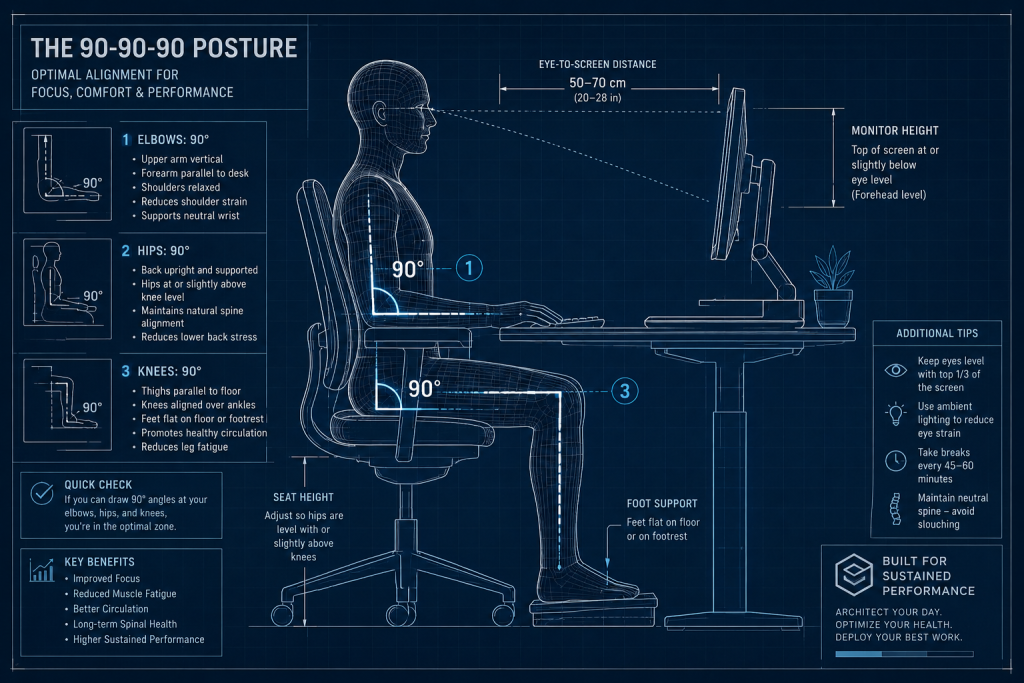
The foundation of a high-performance workspace is the geometry of the seat and desk. To achieve absolute ergonomic dominance, you must adhere to the 90-90-90 Rule, which creates a balanced load across your skeletal frame.
Elbows: Your arms should rest at a 90-degree angle, with your forearms parallel to the desk surface. This prevents strain on the trapezius muscles.
Hips: Your torso and thighs should form a 90-degree angle. This maintains the natural curve of the lumbar spine, preventing the “slumping” that leads to long-term back issues.
Knees: Your legs should be bent at 90 degrees, with your feet planted firmly on the floor. In a city like Da Nang, where you might spend long hours in a home office, a simple footrest can be a viable solution to maintain this angle if your chair is too high.

This alignment ensures that gravity’s force is distributed evenly, allowing you to maintain focus on complex architectural problems without the “noise” of physical discomfort.
3. Keyboard Ergonomics: Tenting, Tilting, and Wrist Logic
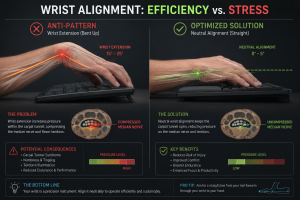
As a mechanical keyboard enthusiast, you understand that the board is your primary input node. However, the standard “flat” keyboard is actually an ergonomic anti-pattern.
The Myth of the Kickstand
Most keyboards feature “feet” at the back to tilt the board upward. From an ergonomic perspective, this is a flaw. Tilting the keyboard up causes wrist extension, which compresses the carpal tunnel and restricts the immediacy of blood flow to your fingers. The most viable setup is actually a neutral or negative tilt, where the keyboard slopes away from you, keeping your wrists perfectly straight.
Tenting and Split Architecture
A more advanced paradigm shift is the move toward “Tenting.” This involves raising the center of the keyboard so that your hands rest at a more natural, angled position (like holding a bowl). Split keyboards—which separate the left and right halves—allow you to keep your shoulders open and retracted, preventing the “rounded shoulder” posture common among software developers. This architectural change in your interface layer can significantly reduce the risk of long-term nerve damage.
4. Visual Logic: Monitor Height and Focal Nuance
Your eyes are the primary “sensors” of your system. If they are strained, your cognitive throughput drops. Managing the nuance of your visual field is integral to avoiding “Computer Vision Syndrome.”
The Eye-Level Standard: The top third of your monitor should be at eye level. This ensures that you are looking slightly downward, which is the most natural position for the eye muscles. If your monitor is too low (a common issue when using the ASUS ROG Strix G16 without a stand), you will unconsciously tilt your head forward—a posture known as “Tech Neck”—which adds up to 27kg of extra pressure on your cervical spine.
The Rule of 20-20-20: To maintain the viability of your vision, every 20 minutes, look at something 20 feet away for 20 seconds. This “refreshes” the focal logic of your eyes, preventing the fatigue that can hinder your performance during high-stakes exams or coding sprints.
5. The Peripheral Ecosystem: Mouse and Lighting
The mouse is often the most neglected part of the ergonomic architecture. Using a standard mouse requires “pronation”—twisting your forearm so that your palm faces down. Over time, this causes strain in the elbow.
A Vertical Mouse or a Trackball is a highly viable alternative. These devices allow your hand to stay in a “handshake” position, which is the anatomical neutral. Furthermore, the nuance of your lighting is critical. Avoid glare on your screen by positioning your desk perpendicular to windows. In Da Nang’s bright coastal light, using a monitor light bar can provide balanced, flicker-free illumination that preserves your focus.
6. The “Stand-up” Routine: Biological System Refactoring
No matter how optimized your architectural setup is, the human body requires movement. In software engineering, we use “Daily Scrums” or “Stand-ups” to sync the team. You should implement a personal “Biological Stand-up” every hour.
Micro-breaks: Standing up for just two minutes every hour improves blood circulation and resets your posture.
Dynamic Workstations: If possible, a sit-stand desk is a powerful tool for maintaining structural integrity. Alternating between sitting and standing keeps your metabolic rate higher and prevents the “static loading” of your muscles. This versatility is the hallmark of a professional who treats their body as a high-value asset.
7. The Solution Architect’s ROI: Health as a Career Asset
As you move toward your software engineering internship in September 2026, your ability to work efficiently for long periods will be your greatest competitive advantage. Investing in an ergonomic chair, a monitor arm, or a split keyboard is not an “expense”—it is a strategic investment in your future.
A Solution Architect who is sidelined by a back injury or carpal tunnel is a system with a critical bottleneck. By ensuring the viability of your physical foundation, you guarantee that you can perform at your peak during your entire career at firms like Google or Facebook. Your GPA of 3.96, your IELTS score, and your coding skills are only as valuable as the “hardware” that runs them.
8. Conclusion: The Holistic Architect
Ergonomics is the science of making the machine fit the human, not the other way around. By mastering the architectural nuances of your workspace, you establish absolute dominance over your environment.
To elucidate the true impact of this practice: it transforms your desk from a place of fatigue into a sanctuary of productivity. By protecting the structural integrity of your body, you ensure the immediacy and quality of your work for decades to come. As you continue your studies at FPT Polytechnic, let your ergonomic setup be a testament to your professional discipline. Remember: a great architect builds systems that last—and that includes the system that is currently reading this article.
