Versus & Comparisons
Razer BlackWidow V4 Pro vs. Corsair K100 RGB: The Battle for Flagship Supremacy
May
In the hyper-competitive landscape of enthusiast-grade peripherals, the quest for dominance has led to the creation of “super-keyboards”—devices that transcend basic functionality to offer an unparalleled user experience. For those seeking the absolute pinnacle of performance, the choice often narrows down to two titans: the Razer BlackWidow V4 Pro and the Corsair K100 RGB. Both keyboards represent a significant financial investment, making it essential to elucidate the nuanced differences that justify their flagship status. This comparison will dive deep into their architectural design, switch technology, and ecosystem integration to determine which board is the more viable choice for your setup.
1. Architectural Integrity and Aesthetics
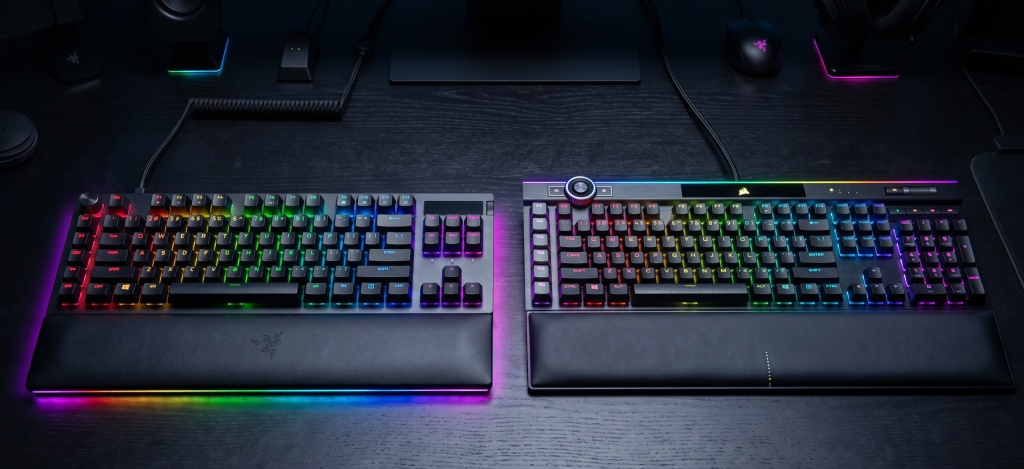
When assessing these two behemoths, the first thing that strikes the observer is their sheer physical presence. Both brands have opted for an industrial design language that screams “premium.”
Corsair K100 RGB: The K100 utilizes a brushed aluminum top frame that feels incredibly sturdy. Its design is iconic, featuring the signature Corsair “lightedge” that wraps around the top and sides, providing a level of RGB dominance that few can match.
Razer BlackWidow V4 Pro: Razer has countered with a slightly more refined, matte-black aluminum finish. While it lacks the wrap-around light bar of the K100, it compensates with an expansive underglow that reflects beautifully off your desk mat.
In terms of footprint, both are full-sized boards that require a significant amount of desk real estate. However, the Razer feels slightly more modern with its cleaner lines, whereas the Corsair retains a more aggressive, “gamer-centric” aesthetic.

2. Performance: The Heart of the Machine
For the elite gamer, the immediacy of input is paramount. This is where the underlying technology of the switches and internal polling rates comes into play.
Corsair’s Optical Edge
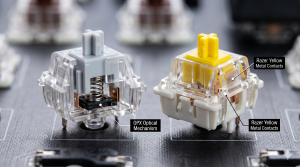
The Corsair K100 RGB ($249) features Corsair’s proprietary OPX Optical-Mechanical switches. By using a beam of light to register a keystroke, these switches eliminate debounce delay, offering a hyper-fast 1.0mm actuation point. Coupled with Corsair’s AXON Hyper-Processing Technology, which supports a native 8000Hz polling rate, the K100 ensures that your actions are translated to the screen with near-zero latency.
Razer’s Mechanical Nuance
The Razer BlackWidow V4 Pro ($229) generally ships with Razer’s latest Mechanical Switches (Green for clicky, Yellow for linear). While mechanical switches are technically “slower” than optical ones due to physical contact, Razer’s 8000Hz polling rate minimizes the gap. The typing experience on the BlackWidow is often cited as being slightly more “natural” for those who prefer the tactile feedback of a traditional mechanical keyboard over the frictionless feel of optical switches.
3. Dedicated Macro and Control Systems
Flagship keyboards are defined by their “extras,” and both companies have gone all-out in providing dedicated controls for media and productivity.
The Razer Command Dial: The standout feature of the V4 Pro is the multi-function Command Dial located at the top left. This dial is highly customizable via Razer Synapse, allowing you to cycle through modes like window switching, zooming, or even specialized functions in creative applications like Photoshop. Additionally, it features 8 dedicated macro keys (5 on the side and 3 on the edge).
The Corsair iCUE Control Wheel: Corsair’s wheel is similar in function but located in a more central position at the top. It is also fully programmable for tasks like track jogging or brightness control. The K100 provides 6 dedicated “G-keys” on the left side, which are fully compatible with Elgato Stream Deck software—a massive advantage for content creators who need instant access to streaming commands.
4. Ergonomics and Comfort
Long gaming or coding sessions require adequate support.
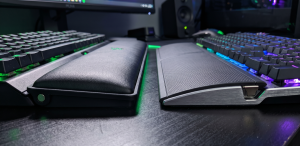
Razer’s Plush Comfort: The BlackWidow V4 Pro includes a magnetic, plush leatherette wrist rest that also features integrated RGB underglow. It is widely considered one of the most comfortable stock wrist rests on the market, offering a soft, cloud-like feel.
Corsair’s Functional Support: The K100 comes with a magnetic, detachable memory foam wrist rest with a textured surface. While it is very comfortable, it is slightly firmer than Razer’s offering and lacks the extra RGB lighting.
5. Software Ecosystem: iCUE vs. Synapse
No comparison would be complete without discussing the software that acts as the brain for these devices.
Corsair iCUE: iCUE is often praised for its depth, particularly in how it handles complex lighting layers and sensor monitoring. However, its interface can be overwhelming for beginners. For the K100, iCUE is essential for unlocking the 4,000Hz or 8,000Hz polling rates.
Razer Synapse: Synapse has seen vast improvements in stability and ease of use. It makes the process of mapping the Command Dial and macros incredibly intuitive. The integration with Chroma RGB allows for a cohesive look across other Razer peripherals and smart home lighting like Philips Hue.
6. Final Verdict: Which One Should You Buy?
Deciding between the Razer BlackWidow V4 Pro and the Corsair K100 RGB depends on your specific priorities.
Choose the Corsair K100 RGB if:
You are a competitive gamer who demands the absolute fastest response times via OPX Optical switches.
You are a streamer who can benefit from the Elgato Stream Deck integration with the dedicated macro keys.
You want the most “over-the-top” RGB experience with the wrap-around Lightedge.
Choose the Razer BlackWidow V4 Pro if:
You prefer a more refined, versatile control system via the Command Dial.
Maximum comfort is a priority—the plush wrist rest is a game-changer for long sessions.
You want a slightly cleaner aesthetic that still offers immersive underglow lighting.
Both keyboards represent a viable evolution in peripheral design. Whether you lean toward Corsair’s raw speed or Razer’s versatile control, you are investing in a product that defines the current era of hardware dominance.
